TikTok Ads Safe Zone Specs 2026
You pay for every impression, and then TikTok covers the one thing you paid to show. A discount code slides under the caption block. The price sits behind the CTA button. The hook lands exactly where the like button lives. The ad is not broken — it is just designed for a clean frame that TikTok never shows.
Paid placements have a tighter safe zone than organic posts, because ads add extra interface on top of the usual UI: a CTA button, an ad headline, a Sponsored label, and — for shopping campaigns — anchors and product cards. The organic zones (top tabs, right rail, bottom caption) still apply, and the ad layer sits on top of them. If you design an ad like an organic post, the bottom third is where your message goes to die.
One honest warning before the numbers: TikTok does not publish a single fixed pixel safe zone. Its Business Help Center says the safe zone depends on three things — the video format, the caption length, and any interactive add-on you attach — and instead of numbers it ships downloadable overlay templates for each placement. The margins below are the conservative production baseline that working creative teams use on a 1080 x 1920 frame, measured from TikTok's own templates and checked against its current spec pages in November 2026. Treat them as a starting grid, then download the current template for your placement from the spec page before every new campaign — and preview your actual creative before you launch.
Quick check: if you want to see the zones on your own frame first, run a screenshot through ReelGuard's free safe zone checker — it overlays the real TikTok, Reels, or Shorts UI on your design in your browser. Nothing is uploaded; everything runs locally.
The Specs at a Glance
- In-Feed ads (non-Spark): 9:16 vertical at 1080 x 1920 (minimum 540 x 960). Square 1:1 (minimum 640 x 640) and horizontal 16:9 (minimum 960 x 540) are accepted, but they play with bars and lose impact — in practice, nearly every served in-feed ad is 9:16. Up to 10 minutes long; MP4, MOV, MPEG, 3GP, or AVI; up to 500 MB; bitrate at least 516 kbps. Ad text is 12-100 characters.
- TopView ads: 9:16 only, minimum 540 x 960. 5 to 60 seconds (TikTok recommends 9 to 15). MP4, MOV, MPEG, or 3GP; up to 500 MB; bitrate at least 2,500 kbps. Caption limit is 100 characters. TopView needs two safe-zone checks, not one — see below.
- Spark Ads: no separate upload spec — Spark boosts an existing organic post, so it inherits that post's video, caption (up to 4 displayed lines, not editable), and safe zone. If the organic post's text is covered, the ad is covered too. Check the post before you boost it.
The TikTok Ads Safe Zone on 1080 x 1920
On a standard In-Feed ad, the fully safe area is roughly the center 38-50% of the frame. Work to these margins on a 1080 x 1920 canvas:
- Top: keep the top 130-240 px clear. The For You and Following tabs, search, and the phone's status bar sit here. Measured templates put the top edge of the safe area at about 240 px; the looser 130 px figure is the minimum for a short caption with no add-ons.
- Bottom: keep the bottom 400-660 px clear — more if your caption is long. This is where the damage happens: username, caption, music ticker, ad headline, and the CTA button stack up here. A four-line caption plus a shopping anchor can push the dead zone past 1,000 px from the bottom. Short captions buy you usable frame for free.
- Right: keep the right 120-140 px clear. The profile photo, follow button, and the like, comment, share, and save stack run down the right edge, and the spinning record icon owns the bottom-right corner.
- Left: leave about 44-60 px of margin. This guards against edge cropping across device sizes and the video progress area.
Put together, the safe area on a standard In-Feed ad is roughly x 120 to 960, y 240 to 1260 — a stepped box that shrinks further when the caption runs long. Nothing right of x 780 below y 840 is safe: that is where the action buttons live.
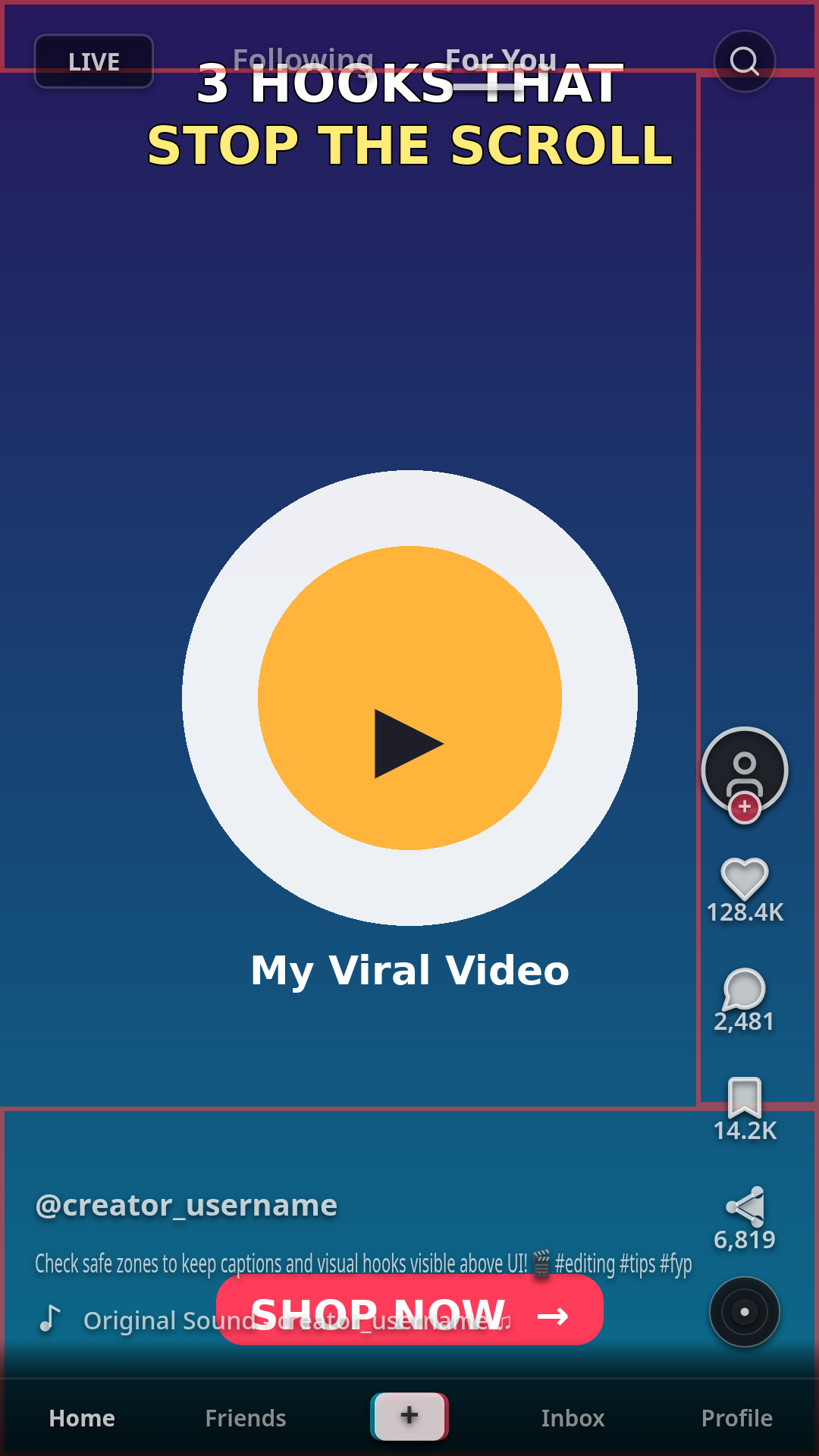
In-Feed Ads: Where the CTA and Caption Actually Sit
On an in-feed ad, TikTok places its own CTA button — Shop Now, Learn More, Download, and the rest — across the bottom of the frame, with the ad headline just above it and the Sponsored label, advertiser name, and caption at the bottom-left. Do not hard-code your own button at the bottom of the video: TikTok's CTA owns that space, and your baked-in button will sit behind it, half-visible, looking broken. Leave room and rely on the Ads Manager CTA overlay instead.
The caption is the lever most advertisers forget. TikTok caps ad text at 100 characters, and up to 4 lines display before a See more link appears. Every extra line pushes the dead zone higher. Keep the caption tight — one line if you can — and the safe area grows. The same goes for anchors and product cards: each add-on takes frame, so a shopping ad's safe zone is smaller than a plain brand ad's.
TopView: Two Safe Zones, Not One
TopView is the full-screen ad that plays when someone opens TikTok. It has two stages, and each has its own safe zone. For the first 3 seconds it plays full-screen with almost no interface — that opening is the only time the whole frame is yours. After 3 seconds it drops into the in-feed stage, and the same in-feed zones apply: tabs, right rail, caption, and CTA.
Design for both. Put the brand and the hook where they survive the second stage, not just the opening — a logo that looks perfect in the first 3 seconds and then slides under the tabs is a logo nobody sees. And keep the video short: 5 to 60 seconds is allowed, but TikTok recommends 9 to 15, and the first 3 seconds decide whether anyone stays.
Spark Ads: The Safe Zone You Don't Control
Spark Ads boost a post that already exists, so the safe zone is the organic post's safe zone. You cannot reframe the video or rewrite the caption inside Ads Manager — the caption shows up to 4 lines and is not editable. That makes the organic check the ad check: run the post through the safe zone rules in our TikTok Safe Zone Dimensions 2026 guide before you boost it. If the hook text is under the like button in the organic post, it will be under the like button in the ad too — except now you are paying for the impressions.
Where to Put the Hook, the Price, and the CTA
- Hook text in the upper-middle band, roughly 250-600 px from the top. It clears the tabs row and sits where the eye lands in the first second.
- Burned-in captions in the center third of the frame, around 550-700 px from the bottom. Subtitles placed at the bottom get eaten by the caption block; centered captions stay readable.
- Price, promo code, and product close-ups in the center. The bottom 380 px is never safe on an ad — the CTA covers the full bottom width, unlike organic posts where the bottom-right is partly clear.
- Faces and the product in the middle of the frame. Keep them out of the right rail and the bottom caption area for the whole time they are on screen.
- Never hard-code a button, arrow, or Swipe up at the bottom. Keep any such callout at least 320 px above the bottom edge, inside the safe zone, or leave it to TikTok's CTA.
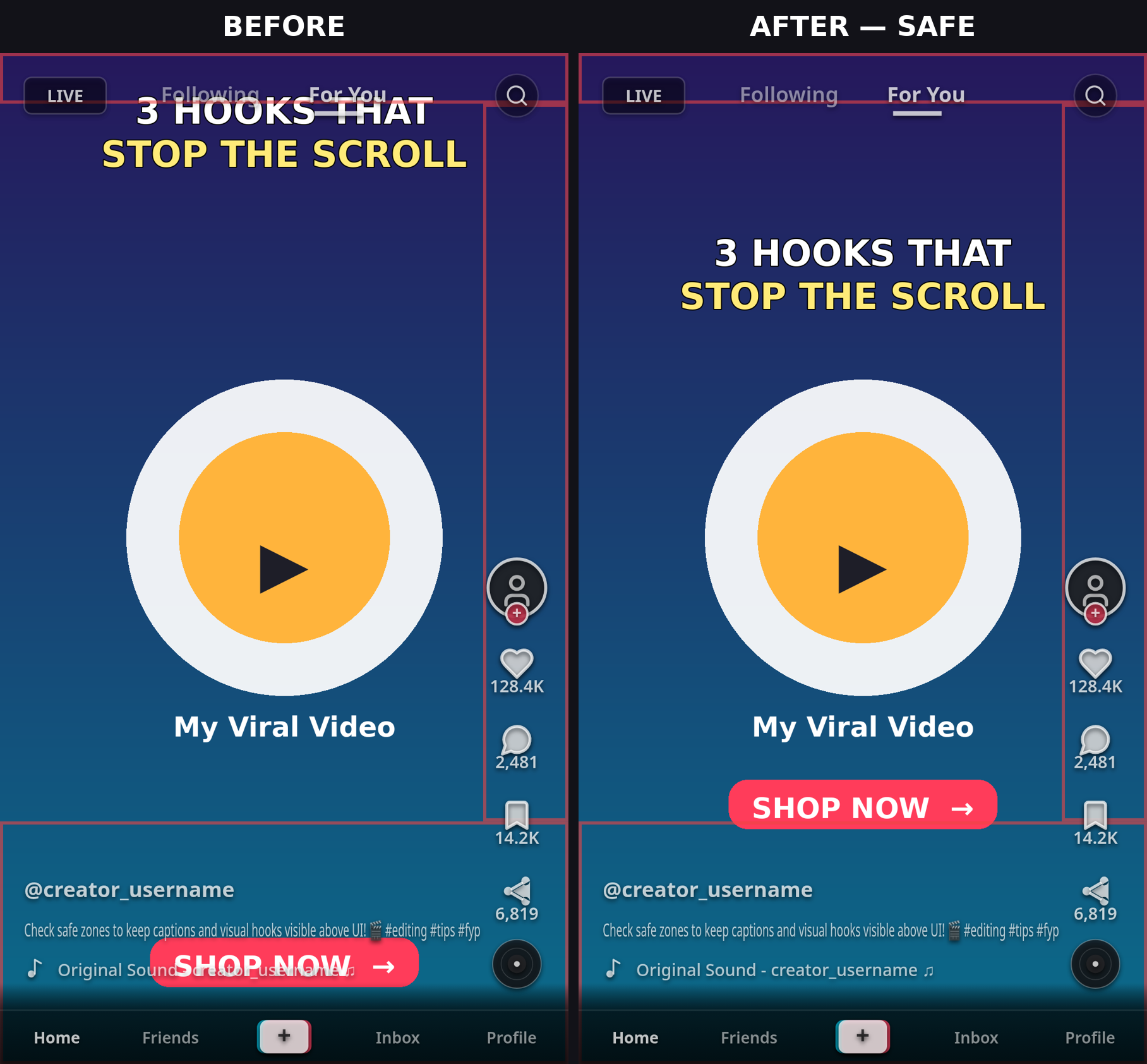
Square and Horizontal Ads
If you run square or horizontal in-feed ads, the zones change shape. For a 1:1 square ad, keep about 60 px clear on the left, 140 px on the right, and 130 px from the bottom. For 16:9 horizontal, the video plays letterboxed inside the vertical feed, so the safe area is the video's own frame minus the same caption and CTA band at the bottom — check it against the placement template, because the bars change where the UI lands. In practice, shoot 9:16 first: it fills the screen, needs the fewest resizing decisions from TikTok, and gives your creative team one safe-zone template to learn.
One Creative, Three Placements? Check All Three
The same ad creative rarely stays safe across TikTok, Reels, and Shorts ad placements — the zones move between platforms, and each adds its own CTA and caption layer. If one creative runs everywhere, check it against each platform's zones, or design to the tightest shared area.
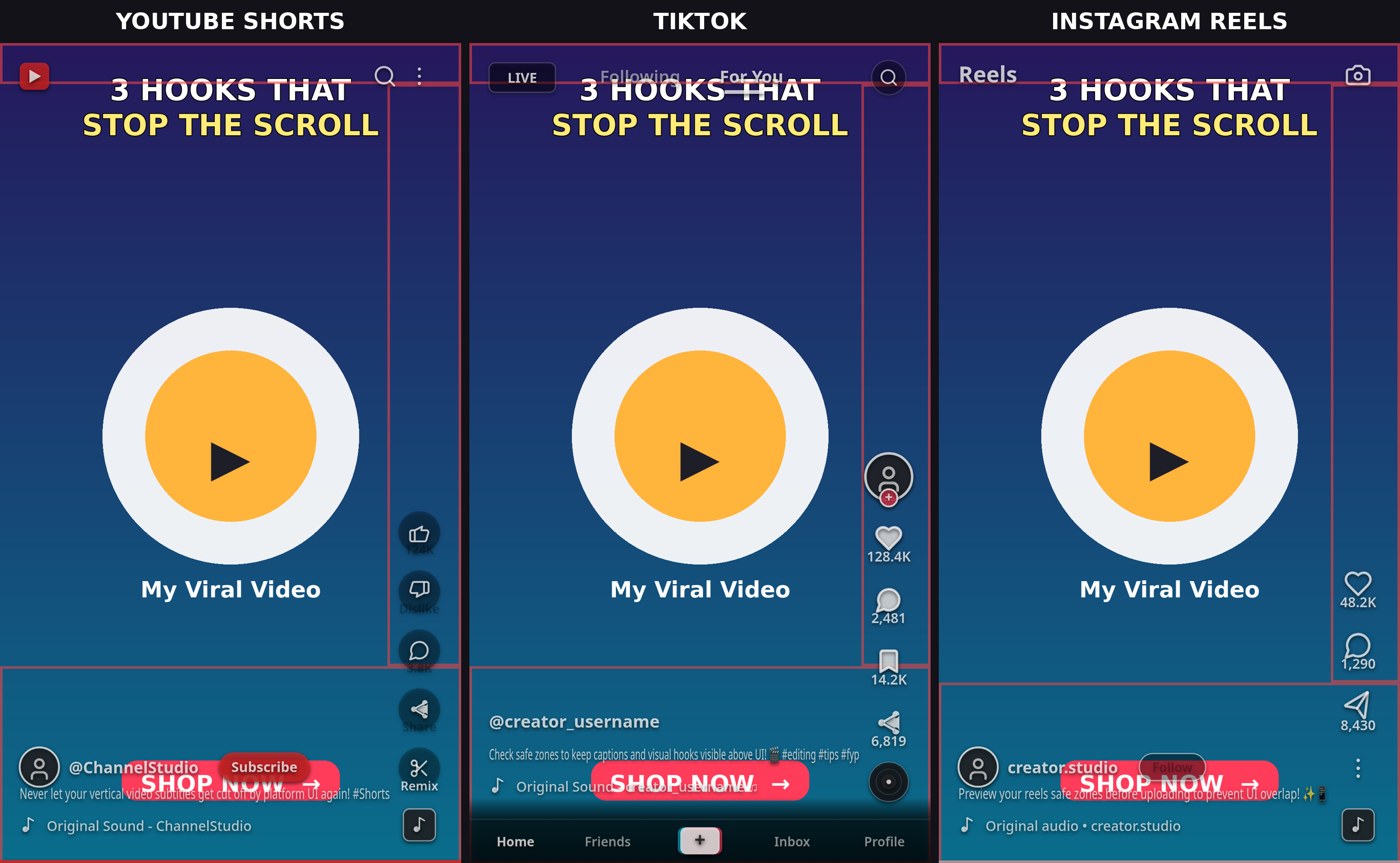
For the full numbers, see our TikTok Safe Zone Dimensions 2026 guide, Instagram Reels Safe Zone Dimensions 2026 guide, and YouTube Shorts Safe Zone Dimensions 2026 guide — and our Premiere Pro safe zone overlay guide, After Effects safe zone overlay guide, and DaVinci Resolve safe zone overlay guide for the same workflow in your editor.
Common Mistakes
- Designing for the organic safe zone. Ads add a CTA, headline, and anchors on top of the organic UI — the ad safe zone is tighter.
- Hard-coding a CTA button at the bottom. TikTok's CTA owns that space; yours will sit behind it.
- A long caption. Every extra line pushes the dead zone higher — keep ad text short.
- Checking only the TopView opening. After 3 seconds the in-feed zones apply; design for the second stage.
- Boosting a Spark Ad without checking the organic post. The ad inherits the post's covered text — and now you pay for it.
- Trusting one blog's pixel table as gospel. TikTok ships templates, not fixed numbers. Download the current template for your placement before every campaign.
Pre-Launch Checklist
- Video is 9:16 at 1080 x 1920, under 500 MB, correct format and bitrate for the placement.
- Hook, price, and promo code sit inside the safe area — top 240 px and bottom 660 px clear, more if the caption is long.
- No hard-coded button at the bottom; TikTok's CTA owns it.
- Caption is short — ideally one line — and ad text is within 12-100 characters.
- TopView: brand and hook survive the post-3-second in-feed stage, not just the opening.
- Spark: the organic post passes the safe zone check before you boost it.
- One preview of the actual creative against the real zones — then launch.
FAQ
What are the TikTok ads safe zone specs for 2026? For a 9:16 In-Feed ad at 1080 x 1920, keep key content out of the top 130-240 px, the bottom 400-660 px, and the right 120-140 px, with about 44-60 px on the left. That leaves roughly the center 38-50% of the frame fully safe. TikTok does not publish one fixed pixel box — the safe zone depends on the format, caption length, and add-ons — so download the current overlay template for your placement from the spec page and preview your creative before launch.
What size should a TikTok ad be? Vertical 9:16 at 1080 x 1920 pixels. TikTok's minimum for vertical In-Feed ads is 540 x 960, and its creative guidelines recommend shooting at 720p or higher. Square 1:1 and horizontal 16:9 are accepted for In-Feed ads, but they play with bars and lose impact — nearly every served in-feed ad is 9:16.
How long can a TikTok ad be? In-Feed ads run up to 10 minutes. TopView runs 5 to 60 seconds, with TikTok recommending 9 to 15 seconds. Spark Ads inherit the original post, which can be up to 10 minutes.
Where does the CTA button sit on a TikTok ad? TikTok places its own CTA button across the bottom of the frame, with the ad headline just above it and the caption at the bottom-left. Do not hard-code your own button at the bottom of the video — it will sit behind TikTok's CTA. Leave room and use the Ads Manager CTA overlay.
Why does my TikTok ad text get covered? Ads add a CTA button, headline, Sponsored label, and sometimes anchors or product cards on top of the usual TikTok UI — tabs at the top, right rail, and caption block at the bottom. Text outside the center safe area gets covered. Long captions make it worse: every extra line pushes the dead zone higher.
Do Spark Ads have a different safe zone? Spark Ads use the original organic post's safe zone — the video and caption are inherited, not re-uploaded. Check the organic post against the safe zone rules before you boost it, because any covered text in the post stays covered in the ad.
Part of the ReelGuard safe zone series: TikTok Safe Zone Dimensions 2026 · Instagram Reels Safe Zone Dimensions 2026 · YouTube Shorts Safe Zone Dimensions 2026 · How to Add a Safe Zone Overlay in CapCut